
If you enjoy reading manga online, you’ve probably heard about Tachiyomi. For years, it has been one of the most popular open-source manga readers for Android users. One of its biggest strengths is its powerful extension system, which allows readers to access manga from hundreds of different sources within a single app.
However, many users are still confused about how a Tachiyomi extension works, where to find safe extensions, how to install them, and what alternatives are available after the official project ended.
This guide explains everything you need to know about Tachiyomi extensions, including how they work, how to install them safely, common troubleshooting tips, and the best practices for an enjoyable manga-reading experience.
What Is a Tachiyomi Extension?
A Tachiyomi extension is a small add-on that connects the Tachiyomi app with an online manga source. Instead of hosting manga itself, Tachiyomi simply reads content from websites through these extensions.
Each extension acts like a bridge between the app and a particular manga provider. Once installed, you can browse, search, and read manga available on that source directly inside the app.
This modular design keeps the app lightweight while giving users complete flexibility over which sources they want to use.
Why Are Tachiyomi Extensions Popular?
Millions of manga readers appreciate Tachiyomi extensions because they provide convenience and customization.
Some major benefits include:
- Access to multiple manga sources
- Faster searching across libraries
- Automatic chapter updates
- Offline reading support
- Bookmark synchronization
- Custom reading settings
- No unnecessary advertisements inside the reader
- Open-source ecosystem
Instead of installing multiple reading apps, users can organize everything in one place.
How Do Tachiyomi Extensions Work?
Extensions are essentially source plugins.
When you install one:
- The extension connects to a supported manga website.
- It retrieves manga titles and chapter information.
- Images are displayed inside the Tachiyomi reader.
- Your reading progress is saved locally.
The extension does not usually store manga itself. It simply fetches content from supported websites whenever requested.
Types of Tachiyomi Extensions
Different extensions support different content categories.
| Extension Type | Description | Best For |
|---|---|---|
| Manga Sources | Traditional Japanese manga | Manga readers |
| Manhwa Sources | Korean comics | Webtoon fans |
| Manhua Sources | Chinese comics | Chinese series readers |
| Comic Sources | Western comics | Comic enthusiasts |
| Multi-language Sources | Supports several languages | International users |
Choosing the right extension depends on the language and type of content you prefer.
How to Install a Tachiyomi Extension
Installing extensions is fairly straightforward.
Step 1
Install the latest compatible Tachiyomi-based application.
Step 2
Open the Browse section.
Step 3
Navigate to Extensions.
Step 4
Search for your preferred source.
Step 5
Tap Install.
Step 6
Accept installation if Android asks for permission.
Step 7
After installation, return to Sources and begin browsing manga.
Are Tachiyomi Extensions Safe?
Generally, extensions themselves are safe when obtained from trusted repositories.
To improve security:
- Download extensions only from reputable sources.
- Avoid modified APKs from unknown websites.
- Keep your app updated.
- Review requested permissions.
- Never install suspicious third-party extensions.
Being cautious significantly reduces security risks.
Why Some Extensions Stop Working
Occasionally an extension may stop functioning.
Common reasons include:
- Website layout changes
- Source server downtime
- Regional restrictions
- Internet connectivity issues
- Outdated extension version
- Cloudflare protection
- Temporary maintenance
Most issues are resolved after the extension receives an update.
How to Update Tachiyomi Extensions
Keeping extensions updated ensures compatibility with source websites.
To update:
- Open Extensions.
- Check for available updates.
- Install updates.
- Restart the application if necessary.
Regular updates help prevent loading errors.
Best Practices for Using Tachiyomi Extensions
Following a few habits can improve your experience.
- Install only the extensions you actually use.
- Remove outdated or broken sources.
- Organize your manga library.
- Enable automatic updates when available.
- Download chapters for offline reading.
- Back up your library regularly.
- Clear cache occasionally.
These simple practices keep the app running smoothly.
Common Problems and Solutions
Extension Not Installing
Possible causes include:
- Unknown sources disabled
- Android compatibility issues
- Corrupted download
Try reinstalling the extension after enabling installation permissions.
Manga Not Loading
Possible reasons include:
- Website temporarily offline
- Internet connection problem
- Source maintenance
Refreshing the source often fixes the issue.
Chapters Missing
Sometimes publishers remove chapters or change URLs.
Updating the extension usually restores access if the source has been updated.
Slow Loading
Slow performance often results from:
- Busy source servers
- Weak internet connection
- Large image files
- Cache issues
Clearing the cache may improve loading speed.
Alternatives After the Original Tachiyomi Project
Although the original project is no longer actively maintained, the community has developed several successors that continue supporting the familiar reading experience.
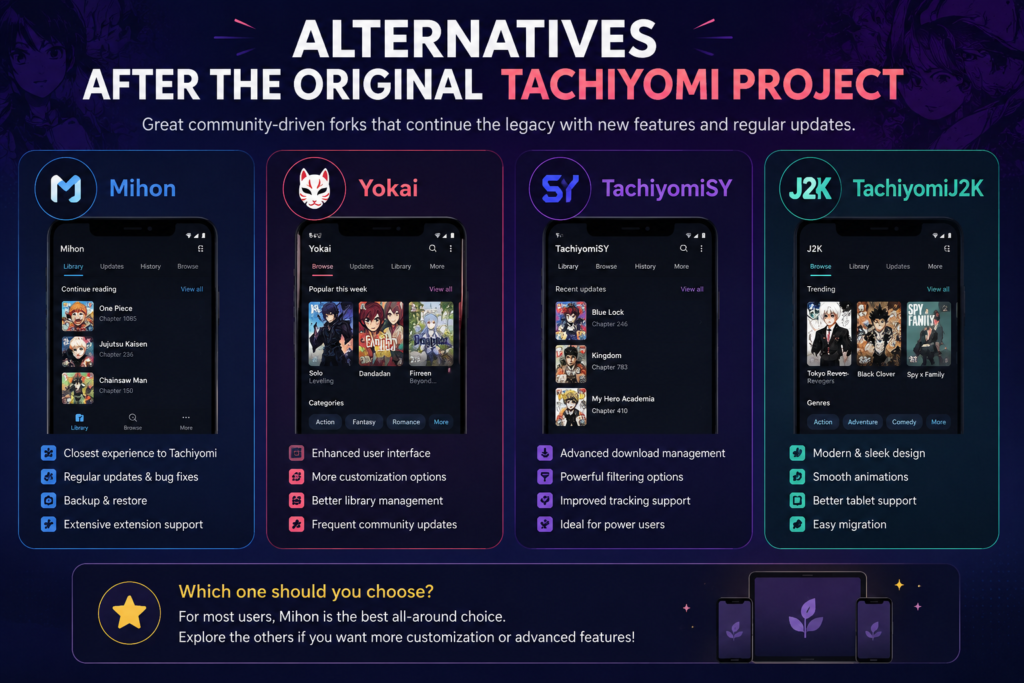
Popular community alternatives focus on:
- Improved extension support
- Faster updates
- Better Android compatibility
- Enhanced performance
- Active community maintenance
Before switching, always verify that you are downloading software from trusted and legitimate sources.
Tips for a Better Manga Reading Experience
A few adjustments can make reading more enjoyable.
- Use dark mode during nighttime reading.
- Customize reading direction.
- Adjust page transitions.
- Organize manga into categories.
- Download favorite series before traveling.
- Enable automatic backup.
- Sync your reading progress regularly.
Small optimizations greatly improve long reading sessions.
Frequently Asked Questions
Is Tachiyomi free?
Yes. Tachiyomi has historically been free and open source.
Do Tachiyomi extensions contain manga?
No. Extensions simply connect the application to supported online sources.
Why does an extension suddenly stop working?
Usually because the source website changed its structure or is temporarily unavailable. Updating the extension often resolves the issue.
Can I install multiple extensions?
Yes. Users can install as many compatible extensions as they need.
Is it safe to download third-party extensions?
Only if they come from trusted repositories. Avoid downloading modified extensions from unknown websites.
Do extensions work offline?
Extensions require an internet connection to fetch new content, but downloaded chapters can be read offline.
Final Thoughts
The Tachiyomi extension system remains one of the most flexible ways to organize and read manga from multiple sources in a single application. Its modular approach allows readers to customize their experience while keeping the app lightweight and efficient.
Whether you’re new to digital manga or a longtime fan, understanding how extensions work, keeping them updated, and using trusted sources will provide a smoother and more reliable reading experience. By following the best practices outlined in this guide, you can enjoy a well-organized manga library and minimize common technical issues while making the most of the Tachiyomi ecosystem.
Also Read: Game Mods Lync Conf: The Complete Guide to Safe, Creative, and Enhanced Gaming